Connect Claude to VibeFactory in two minutes
Server address: https://vibefactory.ai/api/mcp
Most people who build dashboards with VibeFactory already spend part of their day in an AI chat. They clean data with Claude, ask Cursor to write a script, draft the quarterly summary in a chat window. Until now, the dashboard itself still meant opening the web app. With the new VibeFactory MCP server, the dashboard comes to the chat instead.
Here is what that looks like in practice. You ask Claude to list your VibeFactory dashboards, and it does:
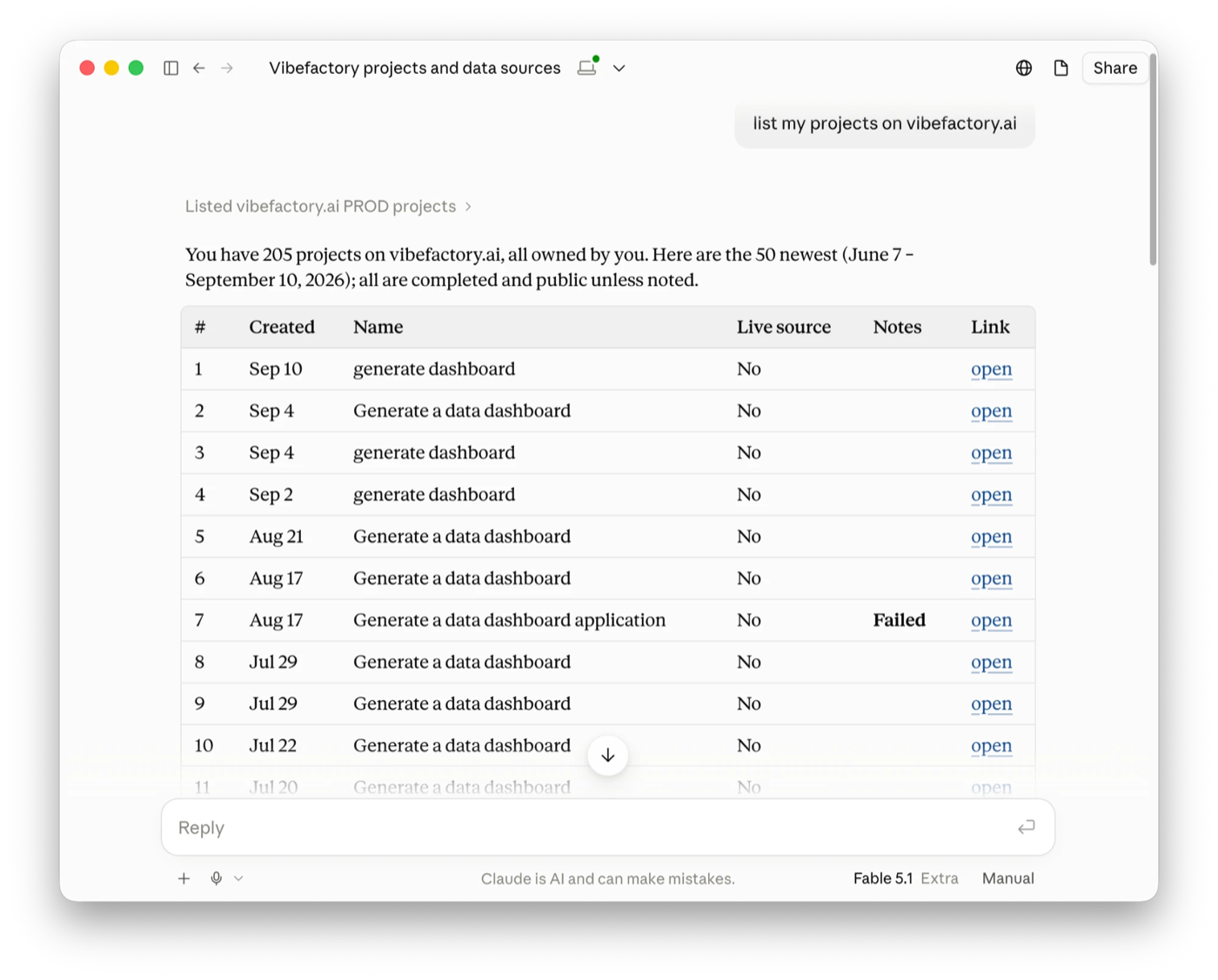
From there, the conversation continues naturally: "build a financial performance dashboard from the file I uploaded this morning", "add a monthly margin chart to the sales dashboard", "is the build finished?", "make it private". Each request becomes an action on your VibeFactory account, and Claude reports back with the live link.
What an MCP server is, in one paragraph
MCP stands for Model Context Protocol, an open standard for letting AI assistants use external tools and services. An MCP server is the piece a product publishes so that Claude, Cursor and other AI tools can talk to it in a structured way. Claude calls these connections connectors; its directory lists more than 950 of them as of mid-2026. VibeFactory's server is a remote MCP server, which means there is nothing to install: you paste an address, sign in, and you are connected.
What your AI assistant can do with it
The server exposes twelve actions. Your assistant picks the right one from your request; you never need to know their names, but it helps to know what is possible.
| You say | What happens | Credits spent |
|---|---|---|
| "List my dashboards" | Your projects with status and live URL, paged for large accounts | None |
| "Which files have I uploaded?" | Data files that are not yet used by a dashboard | None |
| "Build a sales dashboard from that file" | Creates and deploys a new dashboard from a prompt and a data file | About 2 |
| "Add a margin trend chart" | Sends the change to the VibeFactory agent, which edits and redeploys | Usually under 0.5 |
| "Is it done yet?" | Build progress, the agent's last steps and the deployment state | None |
| "Make it private" | Switches a dashboard between public and password-protected (paid plans) | None |
| "How many credits do I have?" | Your balance and plan limits | None |
| "Stop that change" | Cancels a running agent edit | None |
Credits are the same ones the web app uses. There is no separate charge for using MCP, and the assistant is instructed to tell you the cost before it spends anything. The full list of actions is in the MCP documentation.
How to connect Claude or Cursor to VibeFactory
Everything you need is on one page: Settings, AI clients. It shows the server address and, once you have connected something, the list of AI tools that can act on your account.
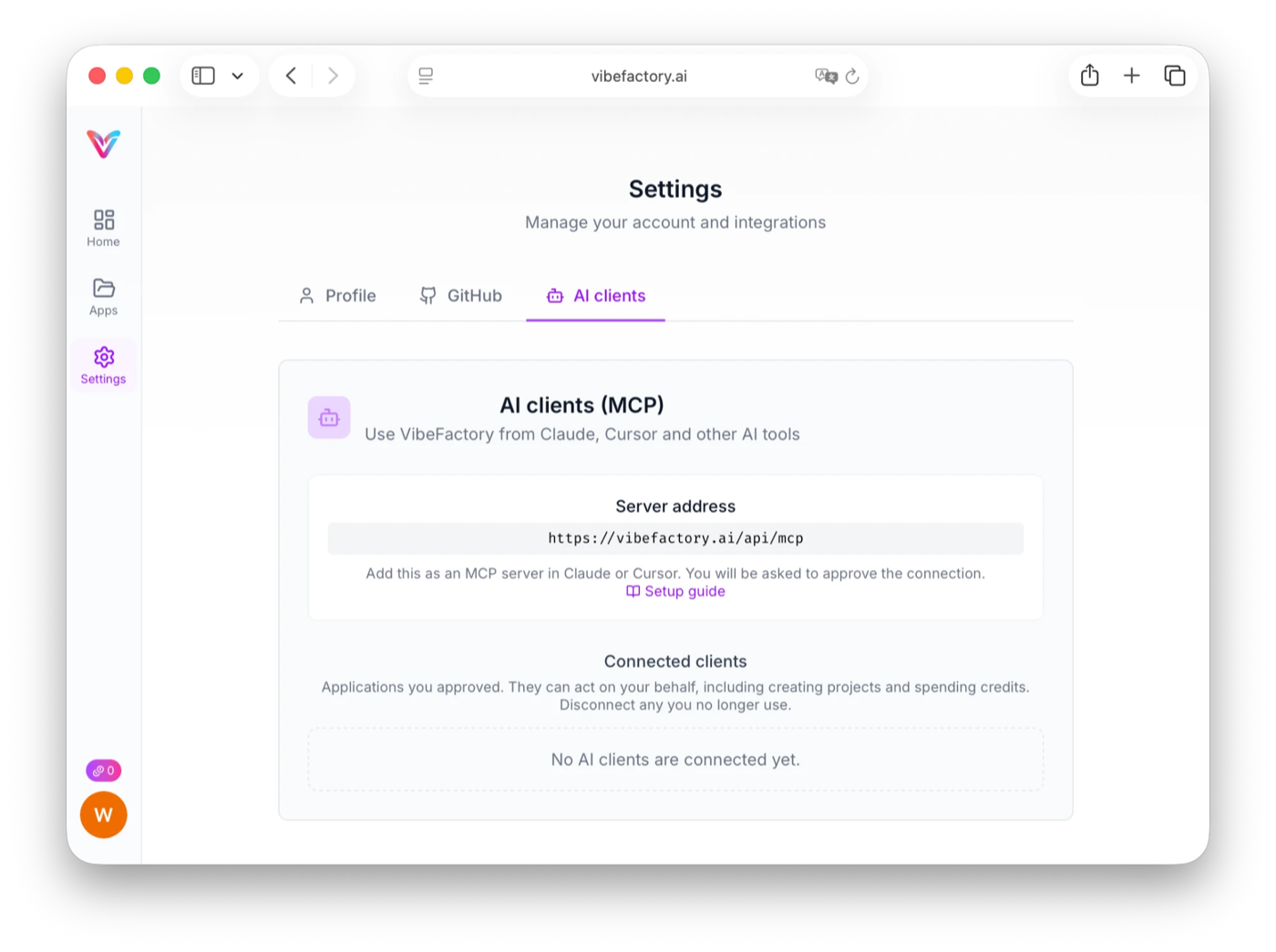
Claude (web and desktop)
- Open Settings, then Connectors.
- Choose Add custom connector.
- Paste
https://vibefactory.ai/api/mcpand confirm. - Claude opens a VibeFactory page. Sign in and click Allow.
A connector added on the web also appears in Claude Desktop. Claude's free plan allows one custom connector; paid plans allow more.
Cursor and other MCP clients
- In Cursor, open Settings, then MCP.
- Add a server of type Streamable HTTP.
- Use the address
https://vibefactory.ai/api/mcp. - Approve the connection on the VibeFactory page that opens.
Any client that supports Streamable HTTP with OAuth works the same way. Start a new chat after adding the server so the tools are picked up.
Prompts that work well
Short and specific beats long and vague, exactly as in the web app. These are prompts we used while testing:
- "List my uploaded files and build a financial performance dashboard from the newest one. Include KPIs for net revenue, gross margin and units sold, a monthly trend, and breakdowns by region and product line."
- "What other charts could we add to the sales dashboard?" (the assistant reads the dashboard and answers; no credits spent)
- "Add a monthly margin trend chart to it, using the existing region filter."
- "Change the background from dark to light and keep everything else as it is."
- "Check whether the last build finished and give me the link."
Every edit ends with a short list of the files that changed and how many lines, so you can see at a glance that only what you asked for was touched.
Excel, CSV and Google Sheets: getting your data in
If you came here looking for an Excel MCP server, note the difference: most Excel MCP servers let Claude read and edit cells in a workbook. VibeFactory does something else with the same file. Claude hands your Excel or CSV data to VibeFactory, and what comes back is a deployed, interactive dashboard with its own URL that you can share, not a spreadsheet. So "can Claude create an Excel dashboard?" now has a short answer: yes, from this connector, and the result lives on the web rather than inside Excel.
A dashboard always starts from a data file, and there are two ways to provide one:
- From the web app: upload an Excel, CSV or JSON file on the dashboard page as usual, then ask your assistant to build from it. This is the simplest path from Claude, which cannot send files from your computer to other services.
- From Cursor or any tool that can run commands: ask it to upload the file directly. The server hands back a one-line upload command, the file goes straight to secure storage, and the dashboard can be built in the same conversation.
Each uploaded file is used for one dashboard. Files you upload and never use are cleaned up automatically. Google Sheets dashboards, which fetch the sheet's current data on every load, are created in the web app for now.
What the MCP server does not do
We kept the first version deliberately narrow. Through MCP, an AI tool cannot:
- Read or edit the source code of your dashboards. If you want the code, connect a project to GitHub in the web app.
- Delete dashboards, change domains or manage sharing. Those stay in the web app, where the confirmation steps are.
- Change dashboards that were shared with you. Only the owner can send instructions to the agent.
- See the password of a private dashboard. Passwords are only ever shown on the project page.
Security and control
Connecting uses OAuth, the same sign-in flow you use for Google or GitHub integrations. You never paste an API key into a chat tool, and VibeFactory never sees your Claude or Cursor credentials. On the approval page you see exactly which application is asking, and only known AI clients can be approved.
Every action an AI tool takes on your account is recorded in VibeFactory's audit log with the client that made it. If you stop using a tool, open Settings, AI clients and click Disconnect. Every token issued to that client stops working immediately.
Pricing
The MCP server is included in every VibeFactory plan at no extra cost. Building and editing dashboards spend the same credits as in the web app, so the pricing page applies unchanged. Reading your dashboards, uploads and balance is free, so you can connect, look around and decide later.
Frequently asked questions
What is the VibeFactory MCP server?▾
A remote MCP (Model Context Protocol) server at https://vibefactory.ai/api/mcp that lets AI tools such as Claude and Cursor use VibeFactory on your behalf. After you approve the connection once, your assistant can list your dashboards, create new ones from uploaded data, request changes and check build status.
How do I connect Claude to VibeFactory?▾
In Claude, open Settings, then Connectors, choose Add custom connector and paste the server address. Claude opens a VibeFactory page where you sign in and approve the connection. The connector then appears in Claude on the web and in Claude Desktop.
Does it work with Cursor?▾
Yes. In Cursor, open Settings, then MCP, and add a server of type Streamable HTTP with the address above. Cursor opens the same approval page. Any MCP client that supports Streamable HTTP with OAuth works the same way.
Does creating a dashboard from Claude cost extra?▾
No. The MCP server uses the same credits as the web app. Building a dashboard costs about 2 credits and most edits cost under half a credit. Listing dashboards, checking status and reading your balance are free. There is no separate MCP fee.
Can Claude see my dashboard source code or passwords through MCP?▾
No. The server exposes a small set of actions: list, create, change, check status and set privacy. It never returns source code, database credentials or the password of a private dashboard. Code lives in the GitHub repository you can connect from the web app, and passwords are only shown on the project page.
How do I disconnect an AI tool from VibeFactory?▾
Open Settings in VibeFactory, go to the AI clients tab and click Disconnect next to the client. Every token issued to that client stops working immediately. You can also remove the connector on the Claude or Cursor side.
Build your next dashboard without leaving Claude
Copy the server address, approve the connection, and ask for a dashboard. Listing and checking are free; you only spend credits when something gets built.
Related guides
AI Excel Dashboard Generator
Step-by-step guide to creating dashboards from Excel files with AI.
LIVEGoogle Sheets Dashboard Generator
Dashboards that show your sheet's current data on every load.
GuideThe 2026 Guide to AI Dashboard Generators
What to look for and how the main tools compare.