Enable Google Sign-In in 2 Minutes
Build your app and add authentication with zero coding
You've built an amazing app. Now you need users to sign in. But traditional authentication is a nightmare: OAuth configurations, API keys, security certificates, database schemas, password hashing...
What if you could add Google Sign-In with a single click? No code, no configuration, no developer accounts. Just professional, secure authentication that works instantly.
Why Google Sign-In Matters for Your App
Higher Conversion
Users are 77% more likely to sign up when social login is available vs. traditional email/password forms.
Passwords to Store
Google handles authentication securely. You never store or manage user passwords - eliminating security risks.
Potential Users
Over 2 billion people have Google accounts. Let them use credentials they already trust.
Setup Time
With VibeFactory, enabling Google Sign-In takes under 2 minutes. No coding, no complexity.
How to Add Google Sign-In (3 Simple Steps)
Open Your Project Settings
Navigate to your project in VibeFactory and click on the "Authentication" tab in the sidebar. This is where all user management features live.
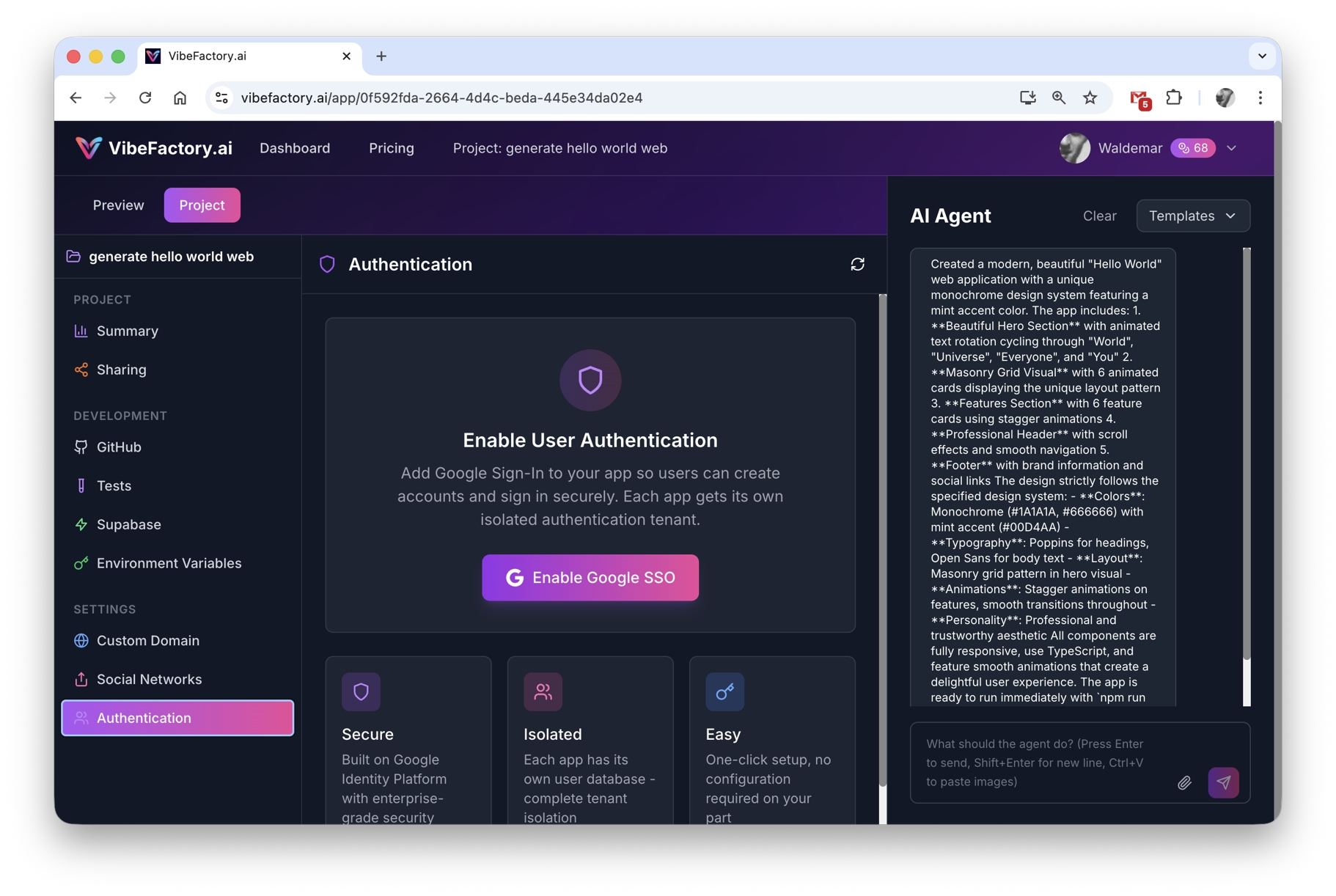
Find the Authentication tab in your project sidebar
Click "Enable Google Sign-In"
One button. That's it. Click "Enable Google Sign-In" and VibeFactory automatically:
- ✓ Creates a secure authentication tenant for your app
- ✓ Configures Google Identity Platform settings
- ✓ Generates the sign-in UI for your app
- ✓ Deploys the changes automatically
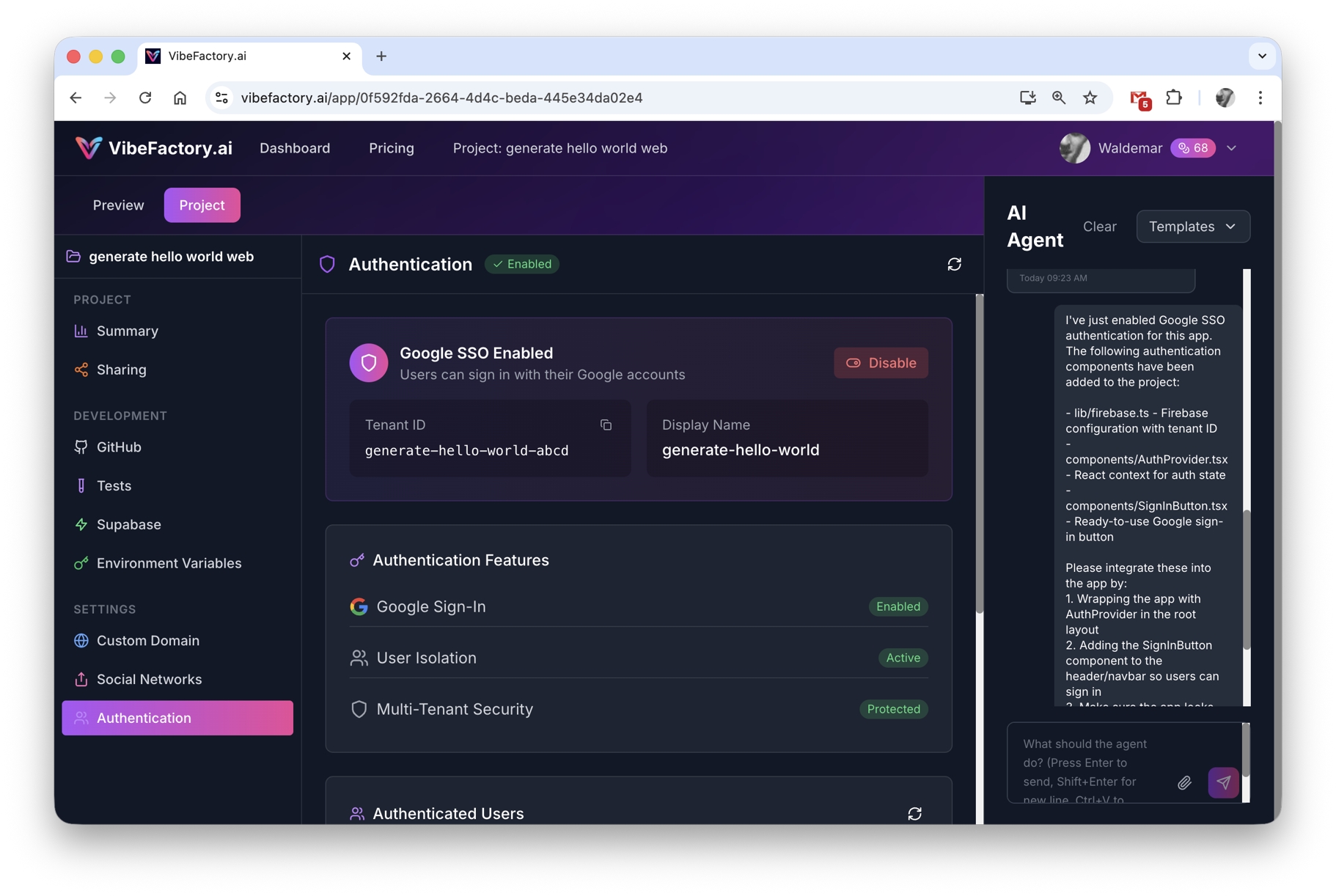
One click enables secure Google authentication
Done! Your App Has Google Login
That's the entire setup. Your customers can now sign in with their Google accounts. You'll see a beautiful "Sign in with Google" button in your app, and authenticated users appear in your dashboard.
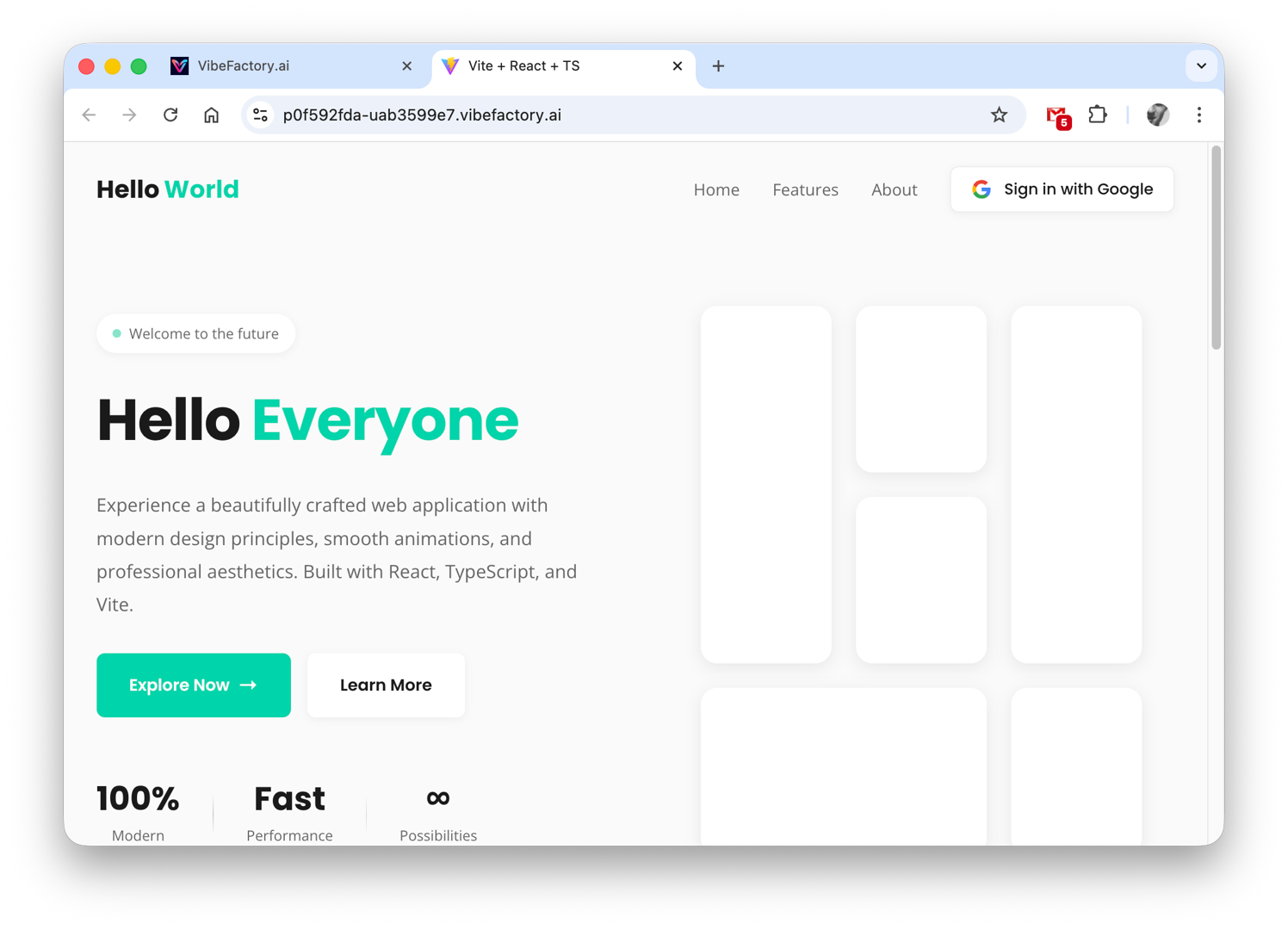
View all authenticated users in your project dashboard
What Your Customers See
After your customers sign in with their Google account, they'll see a personalized welcome screen showing their profile information:
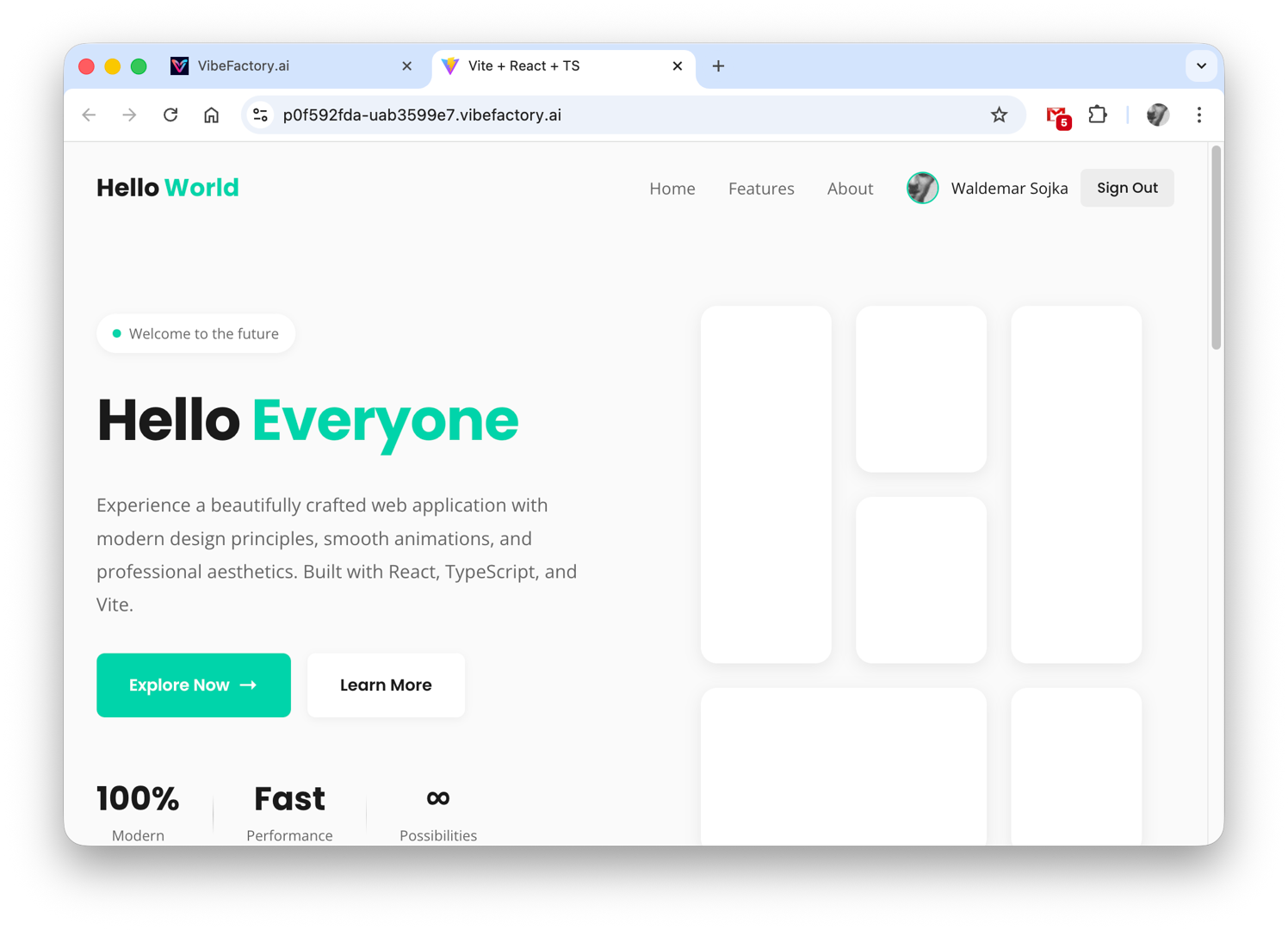
Your customers see their Google profile info after signing in
Secure
Google's industry-leading security protects your users
Fast
One-tap sign in - no forms to fill out
Trusted
Users recognize and trust the Google brand
Zero Technical Knowledge Required
Here's everything you DON'T need to know to add Google Sign-In with VibeFactory:
VibeFactory handles ALL of this automatically. You just click one button.
Traditional Setup vs. VibeFactory
| Task | Traditional Way | VibeFactory |
|---|---|---|
| Create Google Cloud Project | 15-30 minutes | Not needed |
| Configure OAuth Consent | 10-20 minutes | Not needed |
| Create OAuth Credentials | 5-10 minutes | Not needed |
| Set Up Firebase/Identity Platform | 20-60 minutes | Not needed |
| Write Authentication Code | 2-8 hours | Not needed |
| Test & Debug | 1-4 hours | Not needed |
| Total Time | 4-12+ hours | Under 2 minutes |
Enterprise-Grade Security, Zero Effort
Google Identity Platform
Your app uses the same authentication infrastructure trusted by millions of apps worldwide. Google handles all security updates automatically.
No Password Storage
Passwords never touch your app. Google securely manages all credential verification - eliminating the #1 security risk for most apps.
OAuth 2.0 Standard
Industry-standard authentication protocol used by banks, healthcare systems, and government applications worldwide.
Automatic Updates
Security patches and improvements are applied automatically. You never need to update authentication code or worry about vulnerabilities.
Perfect For Any App Type
Internal Dashboards
Let your team sign in with their company Google accounts. Perfect for analytics dashboards, admin panels, and internal tools.
Customer Portals
Give customers easy access to their accounts, order history, or support tickets with one-click Google login.
Educational Apps
Students and teachers already use Google in schools. Let them sign in with familiar Google accounts.
SaaS Products
Launch your SaaS faster with professional authentication built-in from day one. No MVP shortcuts on security.
Frequently Asked Questions
Do I need any coding skills? ▼
No coding skills required! VibeFactory handles all the technical complexity. You literally just click one button to enable Google Sign-In for your app. If you can use a smartphone, you can add authentication to your app.
Do I need a Google Developer account? ▼
No! VibeFactory manages all the Google Cloud configuration for you behind the scenes. You don't need any Google developer accounts, API keys, OAuth credentials, or any technical setup whatsoever.
Is there an extra cost for Google Sign-In? ▼
No additional cost! Google Sign-In is included in all VibeFactory plans. There are no per-user fees, no authentication charges, and no hidden costs. Unlimited users can sign in to your app.
Can I see who signed in to my app? ▼
Yes! VibeFactory shows you a complete list of authenticated users in your project dashboard. You can see their email, display name, profile photo, and when they last signed in.
Is Google Sign-In secure? ▼
Extremely secure! VibeFactory uses Google Identity Platform with industry-standard OAuth 2.0 security. Your users' passwords are handled by Google - they're never stored in your app. This is the same security used by Fortune 500 companies.
Can I disable Google Sign-In later? ▼
Yes! You can disable authentication at any time from your project settings. Existing users will simply need to sign in again when you re-enable it.
Will this work with my existing VibeFactory app? ▼
Yes! You can add Google Sign-In to any existing VibeFactory project. Just navigate to the Authentication tab and click enable - your app will be updated automatically.
Ready to Add Google Sign-In?
Stop struggling with authentication. Let your customers sign in with Google in under 2 minutes.
Related Articles
How VibeFactory handles your data
Complete guide to security best practices for your no-code applications.
GuideTurn Any Spreadsheet into an Interactive Dashboard (No Code)
The complete guide to building professional apps without writing code.
DashboardDashboard Generator Articles
Create AI-powered dashboards from your data - tutorials and guides.